

From Lag to Lightning: Independent Score Benchmarking of Dizzion FRP vs Microsoft RDP and Citrix HDX



In end-user computing solutions such as Cloud PC and Desktop as a Service, the remoting protocol is a foundational component that defines the Digital Employee eXperience. Whether users scroll through documents, watch embedded video, or participate in a call, what appears on their screen determines how productive and satisfied they are. To objectively measure protocol performance, Dizzion engaged performance data scientist Benny Tritsch, who benchmarked the Frame Remoting Protocol (FRP) using the EUC Score Enterprise Test Lab. This methodology evaluates real user experience by synchronizing what the user sees with deep system-under-test telemetry data.
User Experience as the Benchmark Foundation
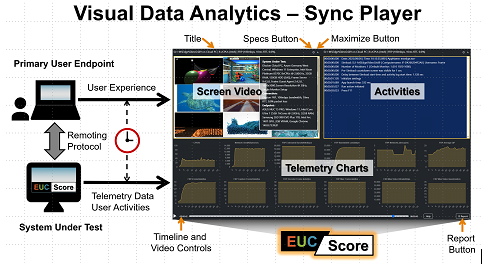
Unlike traditional benchmarks that focus on metrics such as usage, latency, or bitrate, EUC Score correlates visual output, system behaviour, and telemetry in every test sequence. This includes, e.g., CPU utilization, bandwidth consumption, frame rates, latency, compression, and moment-by-moment user-visible performance.
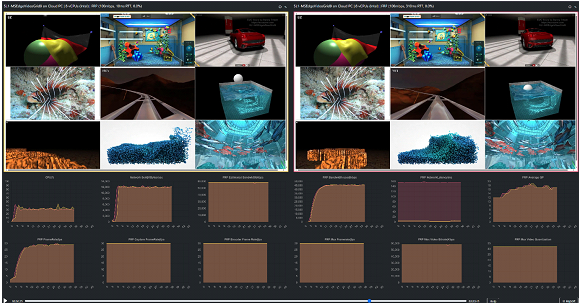
Workloads included Office tasks, document scrolling, HTML5 animations, Video playback, and multi-tile conferencing video apps - the everyday reality of business consumers. Thanks to the unique EUC Score Sync Player's synchronized playback, differences in remoting protocols are impossible to hide.
A Simpler, Faster, and More Predictable Cloud PC Experience
Before testing even began, operational differences were already evident. Accessing and preparing the Dizzion Cloud PC environment was immediate and frictionless. According to Tritsch: “It was much easier to get access to the Dizzion Infrastructure than to the Windows 365 + Citrix Infrastructure - it took substantially longer to get everything up and running on the Citrix and Windows 365 side.”
Workloads That Reveal Real Protocol Behaviour
EUC Score’s simulated workloads behave like a consistent, tireless user. Under various network configurations, they expose artifacts of the remoting protocol's compression, screen freezes, stuttering, inefficiencies, and motion instability in ways that traditional system metrics cannot. This holistic approach helps IT architects diagnose issues accurately and avoid misattributing root causes.
How FRP Adapts to Adverse Network Conditions
Seven different Network Profiles are configured and used with Dizzion FRP, Microsoft RDP (using Win11), and Citrix HDX
- Baseline (Unconstrained): 100 Mbit/s bandwidth limit, no added latency, no added packet loss
- High packet loss: 100 Mbit/s bandwidth limit, no added latency, 2.0% packet loss
- High round trip time: 100 Mbit/s bandwidth limit, 2 x 50ms latency added, no added packet loss
- Low bandwidth: 8 Mbit/s bandwidth limit, no added latency, no added packet loss
- Very high packet loss: 100 Mbit/s bandwidth limit, no added latency, 5.0% packet loss
- Very high round trip time: 100 Mbit/s bandwidth limit, 2 x 150ms latency added, no added packet loss
- Very low bandwidth: 2 Mbit/s bandwidth limit, no added latency, no added packet loss
A consistent theme throughout the benchmark is FRP’s stability under stress.
FRP compensates for packet loss exceptionally well. At levels where RDP freezes and HDX displays block artifacts, FRP remains interactive and visually stable. Tritsch’s analysis is clear: “FRP is very good for compensating for packet loss.”
Even with high round-trip times, FRP maintains motion quality and image fidelity, while RDP begins to degrade into stutter and uneven rendering.
FRP degrades gracefully at 8 Mbps and even at 2 Mbps, while RDP and HDX degrade earlier. The controlled degradation pattern is valuable for real remote work scenarios.
FRP Compared with Microsoft RDP
Windows 11 RDP is optimized for minimal CPU and bandwidth use, but that comes at the cost of graphical fidelity. Motion-heavy workloads reveal this clearly. The benchmark shows:
- FRP delivers smoother animations and transitions
- RDP suffers from frame freezes and motion stutter under packet loss
- FRP maintains high fidelity under the same conditions
Tritsch notes: “FRP can deal with packet loss in a much better way than RDP does. The packet loss affected RDP much more than it affected FRP. FRP delivers high-quality images and animations that require more bandwidth. FRP does use more CPU, but this is a purposeful trade-off for significantly improved quality”.
FRP Compared with Citrix HDX on Windows 365
Citrix HDX is traditionally strong in constrained networks, but in this out-of-the-box Windows 365 Cloud PC scenario, its performance varied. With limited access to Citrix policies and tuning options, HDX:
- Showed block artifacts under packet loss
- Struggled in animation-heavy workloads
- Required more tuning to reach its expected performance
FRP delivered solid results without tuning. Tritsch noted that Cloud PC users are typically generalists, not Citrix specialists, and do not usually need deep policy adjustments to achieve high-quality outcomes. CPU usage between FRP and HDX was similar across most workloads, consistent with both protocols’ higher-quality encoding strategies. As Tritsch explains: “There are so many bells and whistles that you can change in a Citrix environment… and this may be the disadvantage of the HDX protocol.”
And importantly:
“The Cloud PC audience isn’t the expert but more the generalist, and things should work out of the box.” “FRP works out of the box, and we very like need some tuning on the Citrix side. CPU usage between FRP and HDX was nearly identical across most workloads.”
Key Findings
- FRP consistently delivers high-quality graphics and smooth motion.
- FRP adapts automatically to changing network conditions without manual tuning.
- FRP absorbs packet loss more effectively than RDP and HDX.
- Latency impacts responsiveness but not FRP’s visual fidelity.
- FRP handles low bandwidth gracefully and predictably.
- FRP’s higher bandwidth usage directly results in higher visual quality.
- FRP and HDX use similar CPU levels, both higher than RDP.
- HDX on Windows 365 did not deliver consistent quality without tuning.
Benny summarizes:
“Across realistic workloads and degraded network conditions, FRP demonstrated maturity, resilience, and high fidelity. As Tritsch puts it, “FRP is a protocol that is very mature and can keep up with the other mainstream protocols. Across almost all workloads and regardless of network conditions, the FRP session requires more CPU capacity than the RDP session — the price is that graphics quality is lower on the RDP side and higher on the FRP side.”
- Benny’s detailed blog post with all benchmark results is available on his site.
- The presentation used during the discussion is also available for download.
A Browser-Native Protocol for a Modern Workspace
One of Tritsch’s most essential observations centers on architectural philosophy:
“Dizzion and FRP come from the browser as the primary output component, while all the other remoting protocols always had their remote desktop client software. Browser access is their backup plan.”
We already spend most of our workday in the browser using web, SaaS, and AI-driven applications. FRP’s browser-native design aligns directly with this reality. It removes client dependencies, simplifies onboarding, supports zero-trust security models, and accelerates time-to-value, without requiring traditional agents, brokers, or complex setup paths.
Business Value: Why This Matters
Dizzion Cloud PCs powered on IBM Cloud, AWS, and more to come, provide secure, anywhere access to Windows Desktops and Apps through a standard browser, with no data stored on the endpoint and an always-on, centrally managed workspace. This reduces operational complexity by consolidating updates, troubleshooting, and repairs into a single cloud-managed environment, while increasing security because no sensitive data ever resides on local devices. In practical terms, it is your PC in the cloud - consistent, controlled, and available from any location.
The Frame Remoting Protocol (FRP) is built from the ground up to be browser native and performs reliably across a wide range of network conditions. Because Dizzion controls the whole protocol stack, we do not depend on Microsoft technologies such as RDP, brokers, connection servers, or gateways. This independence allows us to deliver predictable performance, faster innovation, and a level of control that legacy remoting protocols can’t match. The business value is clear:
- Increased user productivity and stronger user sentiment
- No Additional Client, Agent, Receive on the end-point - lower helpdesk call volume
- Reliable support for hybrid and remote work programs
- Improved digital employee experience scores
A protocol that breaks under real-world network conditions introduces hidden operational costs and inconsistent user outcomes. FRP’s resilience, simplicity, and browser-native design translate directly into lower TCO and higher employee satisfaction.
Call to Action: Experience FRP and Validate the Results Yourself
The EUC Score findings clearly demonstrate that FRP is a high-performance, browser-native protocol that can match or exceed traditional technologies in the areas that matter most to business. If your organization is evaluating Desktop as a Service (DaaS) or Cloud PCs, modernizing your Microsoft, Citrix, or Omnissa stack, or experiencing challenges with protocol performance, now is the time to validate FRP directly.
If you want access to Try Now environments with NVIDIA-powered GPUs and a range of Design, CAD, Professional Visualization, or HPC applications powered by tools such as Autodesk, Adobe, Unreal, Enscape, and others, feel free to contact us and request a unique invitation code.

Dizzion drives productivity by delivering secure digital workspaces, allowing teams to log in to office platforms anywhere, anytime, and get to work. We ensure that IT workspaces remain scalable and secure, costs stay predictable, and managed services improve efficiency and mitigate risk. Dizzion digital workspace solutions are delivered as Cloud PC, App Streaming, Multi-Session, and DaaS. Dizzion was founded in 2011 and serves more than 300 clients.
Ready to secure your digital workspaces and boost your team's productivity?
Let's Connect